Chapter 14
Plan, credit usage and billing
· Published by Osentio
Checking credit usage
The Credit Usage card at the bottom left of the back office shows the credits used and available in this period (see 4 in the screen tour of chapter 3). Usage grows with every reply the AI agent gives, including replies on the test page, and starts over every month, on yearly plans too.
TipWhen credits run out, the agent stops replying and tells customers that the quota has been used up. When you get close to the limit, consider upgrading, or check for unnecessary test conversations.
Checking your current plan
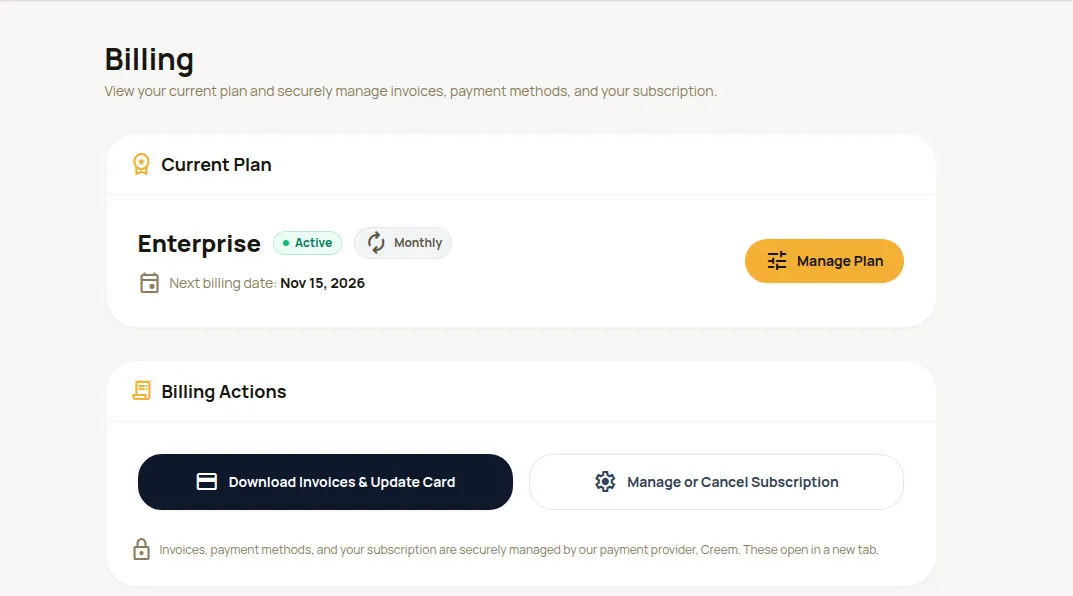
Click your avatar at the top right and choose Billing to see your current plan, billing cycle and next billing date. Past payments are listed further down.
- Manage Plan: go to the plans page to upgrade or change your plan. An upgrade takes effect immediately; a downgrade takes effect at the start of the next billing cycle, and you keep your current plan's benefits until then.
- Billing Actions: Download Invoices & Update Card and Manage or Cancel Subscription. Both open the payment provider's page in a new tab.
TipTraining counts and storage are shown on the right of the Training Data tab (see chapter 5). For questions about subscriptions, payments or invoices, contact support (see chapter 17).